
Best Botless Meeting Recorders in 2026: No-Bot Alternatives to Otter, Fireflies & Fathom
Saving time and effort with Notta, starting from today!
The best AI notetaker without a bot is the one that records locally, works on all of your meeting platforms, and gives you useful AI meeting notes after the call. For most business professionals and teams, Notta Desktop is the strongest all-around pick because it records without a visible meeting bot, supports Mac and Windows, and connects recordings to Notta Brain, the AI capability built into Notta for creating slides, reports, summaries and action items.
If you need free transcription, Otter Desktop is easier to start with. If your team already runs on Fireflies, Fireflies Desktop adds deep integrations and Live Assist. If you require screenshots and text notes during the call, Plaud Desktop is worth a look. Fathom also offers a Mac bot-free beta and a limited Teams alpha on Windows. Check your device, language and account eligibility before choosing it.
Disclaimer: Notta makes one of the products reviewed in this guide. We've included competing tools because the right choice depends on your workflow, budget, and the platforms you use. Any affiliate links are labeled as such. Pricing and features change frequently – check each vendor's site before purchasing.
Best Botless Meeting Recorders in 2026: At A Glance
| Tool | Best for | Botless coverage | Starting price | Main trade-off |
|---|---|---|---|---|
| Notta Desktop | Best all-around botless recorder for meeting notes and post-meeting deliverables | Bot-free capture across supported desktop apps | Free plan; Pro from $8.17/user/mo billed annually | Free recordings have a three-minute limit; Desktop is in public beta |
| Otter Desktop | Simple free botless recording | Bot-free capture across Zoom, Google Meet and Microsoft Teams | Free plan; Pro from $8.33/user/mo billed annually | Six transcription languages; Work availability varies by account |
| Fireflies Desktop | Teams that need integrations and in-meeting AI help | Bot-free desktop audio capture | Free plan; Pro from $10/user/mo billed annually | Bot-free Take Notes saves transcripts and notes, without audio or video files |
| Plaud Desktop | Multimodal capture with screenshots, notes and audio | Bot-free desktop capture | Free Starter with a bound device; Personal Pro $99.99/yr | Personal access requires a bound device; hardware-free Team requires at least two paid seats |
| Fathom Desktop | Mac users eligible for the free bot-free beta | Mac beta; limited Microsoft Teams alpha on Windows | Free plan; Premium from $16/user/mo billed annually | Account and language eligibility apply; saved media depends on capture mode |
What to Compare Before You Choose
We shortlisted tools that give users a realistic way to record meetings without adding a visible bot to the participant list, including the alternatives most often weighed against Otter, Fireflies, and Fathom.
For this list, we focused on five tools with either active desktop or no-bot recording options in 2026. We evaluated each one on recording method, transcription quality, supported platforms, and pricing..
For desktop tools, we tested the full workflow on Zoom, Google Meet, and Microsoft Teams – from install and join, to checking for a visible participant, recording system and mic audio, and reviewing the transcript, summary, and export.
These five tools offer desktop or bot-free capture, but the details can change your choice. I'd compare:
- Your computer, meeting apps and access to any beta features.
- Whether you get a replayable recording or just notes and a transcript.
- The language tasks you need during the conversation.
- The files and follow-up work you can create afterward.
- Free-plan limits, paid features and your team's recording requirements.
We also looked for meaningful trade-offs, not just feature counts. A free tool can be the best pick for a solo user, while a paid tool can be the better pick for a consultant, sales team, or global company that needs multilingual transcription, real-time translation, and client-ready outputs.
Why Desktop Recording Beats Bots
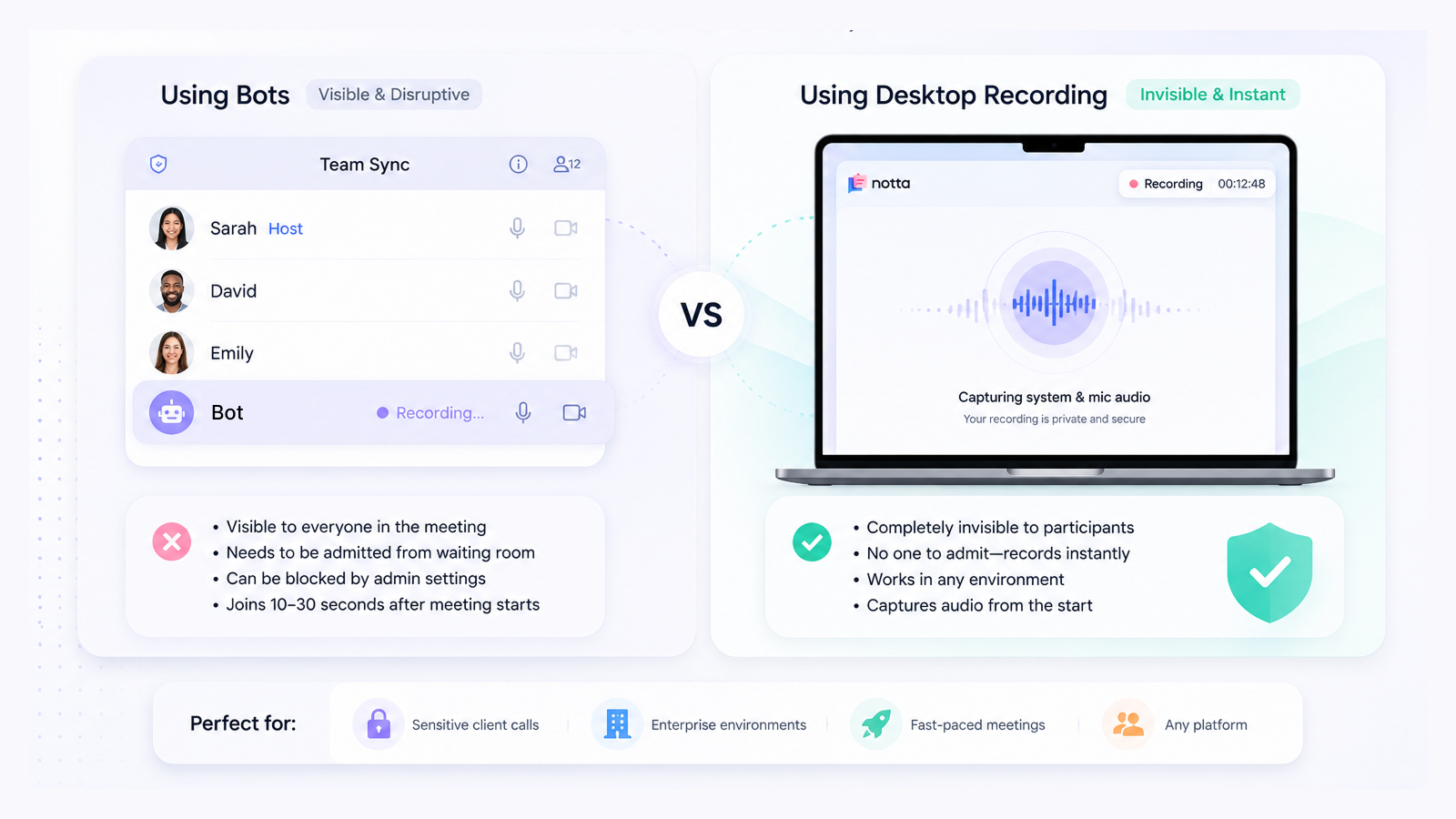
Meeting bots join as visible participants and may also send a recording notice. Desktop capture avoids adding that extra participant.
Here's when a bot becomes a real problem:
Sensitive client calls: you may prefer to keep the participant list focused on the people attending.
Waiting rooms: if the host doesn't admit the bot in time, capture may be delayed or missed.
Blocked platforms:some enterprise environments block bots at the admin level entirely.
Speed: bots take 10–30 seconds to join after a meeting starts; a desktop app records instantly
Desktop capture does not need a bot admitted, but your computer must receive the conversation's audio. App permissions and company policies still apply. A remotely joining meeting bot is a different option when you need automatic attendance.
Bot-free describes how audio is captured. It does not automatically mean offline transcription or invisible recording, and recording notices and consent requirements still apply.
Side-by-Side Comparison
| Feature | Notta Desktop | Otter Desktop | Fireflies Desktop | Plaud Desktop | Fathom Desktop |
|---|---|---|---|---|---|
| Available now | ✅ Public beta | ✅ Available | ✅ Includes Free access | ✅ Beta; Personal or Team eligibility applies | ⚠️ Mac beta; limited Microsoft Teams alpha on Windows |
| Bot-free desktop coverage | ✅ Supported desktop apps | ✅ Zoom, Google Meet and Microsoft Teams | ✅ Supported desktop apps | ✅ Supported desktop apps | ⚠️ Eligible Mac accounts; limited Microsoft Teams alpha on Windows |
| macOS | ✅ macOS 13+ for system-audio capture | ✅ macOS 12.3+ | ✅ Supported | ✅ Supported | ⚠️ Bot-free beta requires macOS 14.2+ and eligible account/language access |
| Windows | ✅ Windows 10 version 1903+ or Windows 11, x64 | ✅ Windows 10+ | ✅ Supported | ✅ Supported | ⚠️ Bot-free capture limited to Microsoft Teams alpha |
| Transcription languages | 58+ in standard mode | 6 | 100+ | 112+ | 20 enabled in the Mac beta |
| Language workflow | ✅ Bilingual transcription from 23 supported languages and live translated text through supported cloud recording routes | ✅ French/English bilingual transcription when French is selected; Chat translation | ✅ Multiple-language transcription; separate Multi-Language mode on Business/Enterprise | One spoken language per recording; ❌ live transcription | 20 Mac beta languages; post-meeting summary translation |
| AI outputs and follow-up | ✅ Brain creates editable files, slides and infographics; AI credits apply | ✅ Work creates Word and PowerPoint files; account rollout applies | ✅ DOCX summary exports on Pro+; Global AskFred drafts and analysis use AI credits | ✅ Work v4.0+ creates reports and slide decks; Plaud Credits apply | Cross-meeting Q&A; further work in connected ChatGPT or Claude |
| Saved content from bot-free capture | ✅ Audio and transcript | ✅ Audio and transcript | Transcript and notes; ❌ saved audio/video files | ✅ Audio, notes and screenshots | Transcript Only saves no media; Audio Only captures audio; Mac Zoom also supports bot-free video |
| Branded hardware recorder | ✅ Notta Memo | ❌ No branded recorder | ❌ No branded recorder | ✅ Plaud recorders | ❌ No branded recorder |
| Free plan includes desktop | ✅ 120 min/mo; three-minute limit per recording | ✅ 300 min/mo; first 30 transcript minutes accessible per conversation | ✅ Desktop included in Free | ✅ Personal Starter: 300 min/mo; bound device required. Hardware-free Team requires at least two paid seats | ✅ Unlimited recording/transcription; bot-free beta eligibility applies |
| Individual paid plan (monthly equivalent, annual billing) | Pro: $8.17/mo | Pro: $8.33/mo | Pro: $10/mo | Personal Pro: $99.99/year (about $8.33/mo) | Premium: $16/mo |
| SOC 2 Type II audit (vendor level) | ✅ Audited | ✅ Audited | ✅ Audited | ✅ Audited | ✅ Audited |
The 5 Best Desktop AI Notetakers in 2026
1. Notta Desktop
Best for: Business professionals and teams that want botless meeting transcription, AI meeting notes, and ready-to-use outputs after the call.
Platforms: macOS 13+ / Windows 10+ (Apple Silicon recommended; best on macOS 14.4+)
Notta Desktop is Notta’s bot-free desktop recorder. It captures system audio and microphone audio from your device, so no visible bot joins the meeting. It is compatible with Zoom, Microsoft Teams, Google Meet, Slack, and other desktop meeting apps, with compatibility across 26+ macOS apps and 17+ Windows apps.
Notta is an AI-powered meeting productivity platform that captures conversations, creates meeting transcription notes and AI summaries, detects action items, and connects recordings to Notta Brain, an AI Meeting Execution Engine.
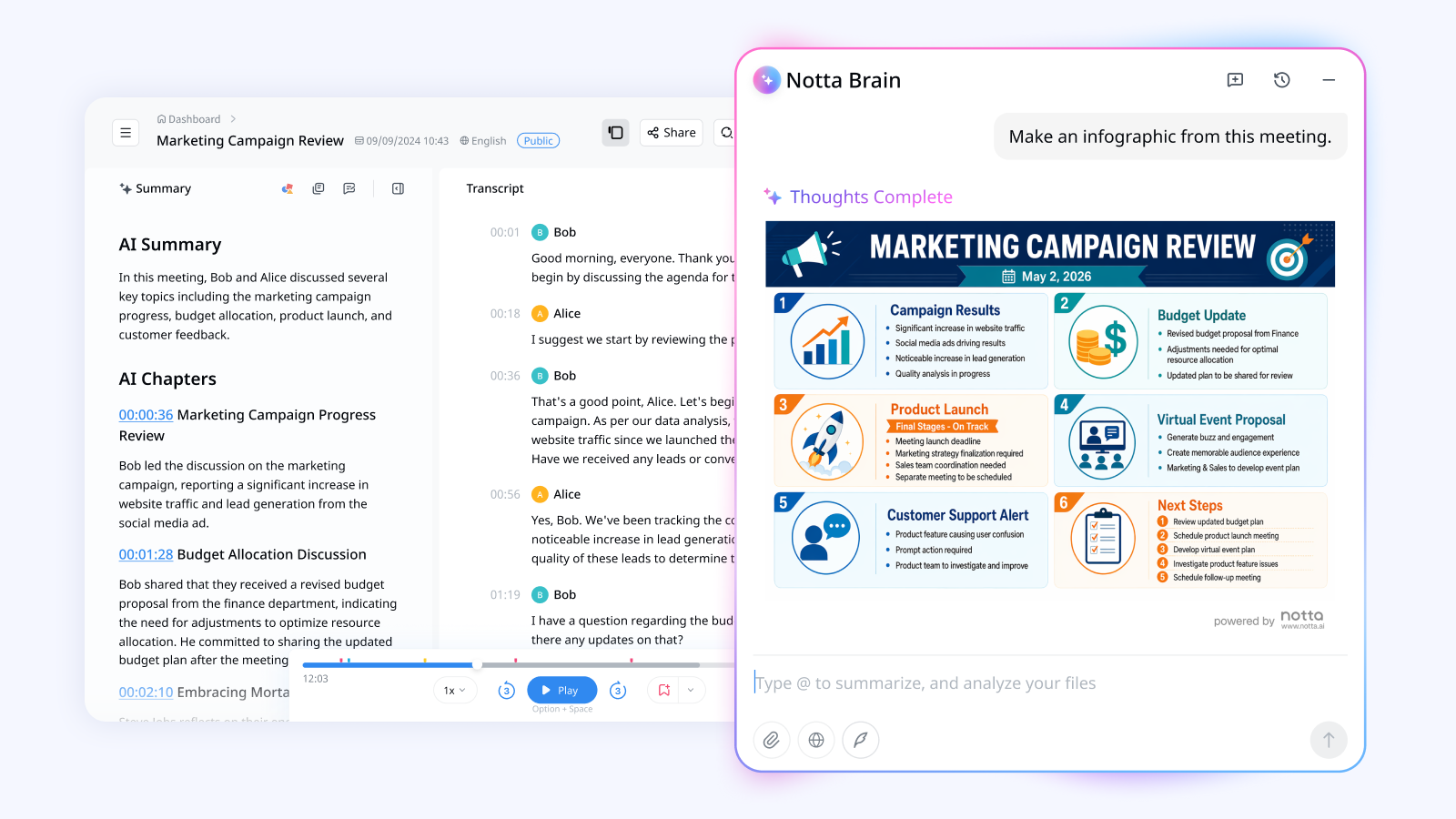
What happens after the call is where I'd look at Notta Brain. Combine meeting context with a client document, spreadsheet or image to create an editable report, presentation or infographic. You can save supported files to Google Drive or share insights to Slack. Brain uses its own AI credits.
What works well:
Fully botless local recording with no waiting-room delay.
Mac and Windows support for teams with mixed devices.
58+ transcription languages, 23 bilingual transcription languages, and 80 real-time translation languages.
Post-meeting infographics, images, and other outputs that go beyond transcripts and summaries.
Specific security coverage includes SOC2 Type II, ISO 27001, GDPR, CCPA, HIPAA, AES-256, and AWS data hosting.
Where it has limits:
Notta Desktop is still in public beta, so teams should test it on their main meeting apps before rolling it out widely.
The US free plan includes 120 transcription minutes per month; users who need 1,800 minutes can upgrade to Pro at $8.17/mo billed annually.
Fireflies has more third-party integrations, so teams with complex CRM and recruiting workflows should compare integration depth before switching.
Pricing: Free plan available for US users with 120 min/mo. Pro starts at $8.17/mo billed annually with 1,800 min/mo. Business starts at $16.67/mo billed annually with unlimited transcription. A 7-day Business trial is available.
2. Otter Desktop
Best for: Solo users who want a simple, free, botless recorder and transcription service for English-heavy meetings.
Platforms: macOS 12.3+ / Windows 10+
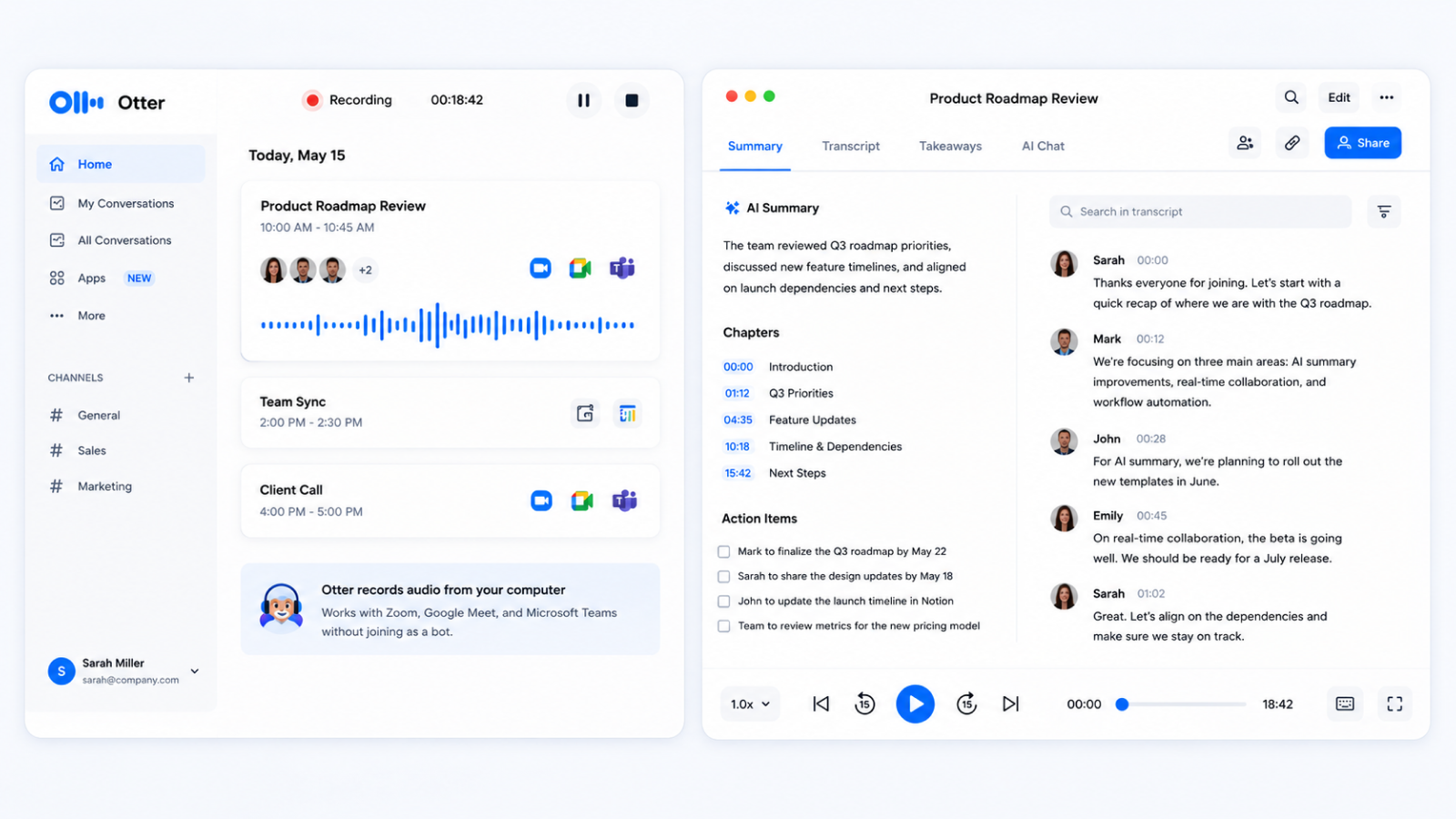
Otter Desktop is the go-to option if you want botless recording without paying first. It captures meetings through your desktop and works across Zoom, Google Meet, and Teams without adding a visible participant to the call. The setup is simple, and the free plan gives you enough minutes to test the workflow.
What works well:
Botless recording across major meeting platforms.
Simple setup and a clean user experience.
Free plan with 300 transcription minutes per month.
Where it has limits:
Otter supports English, Spanish, French, German, Japanese and Simplified Chinese. French and English can share a conversation when French is selected first.
Basic gives you access to the first thirty transcript minutes of each conversation. Recording can continue beyond that point.
Work can create Word and PowerPoint files. Availability is rolling out by account, and connector access depends on your plan.
Pricing: Free plan with 300 min/mo and a 30-minute per-session limit. Pro starts at $8.33/mo billed annually with 1,200 min/mo.
3. Fireflies Desktop
Best for: Teams already using Fireflies that want desktop recording, integrations, and real-time in-meeting help.
Platforms: macOS / Windows
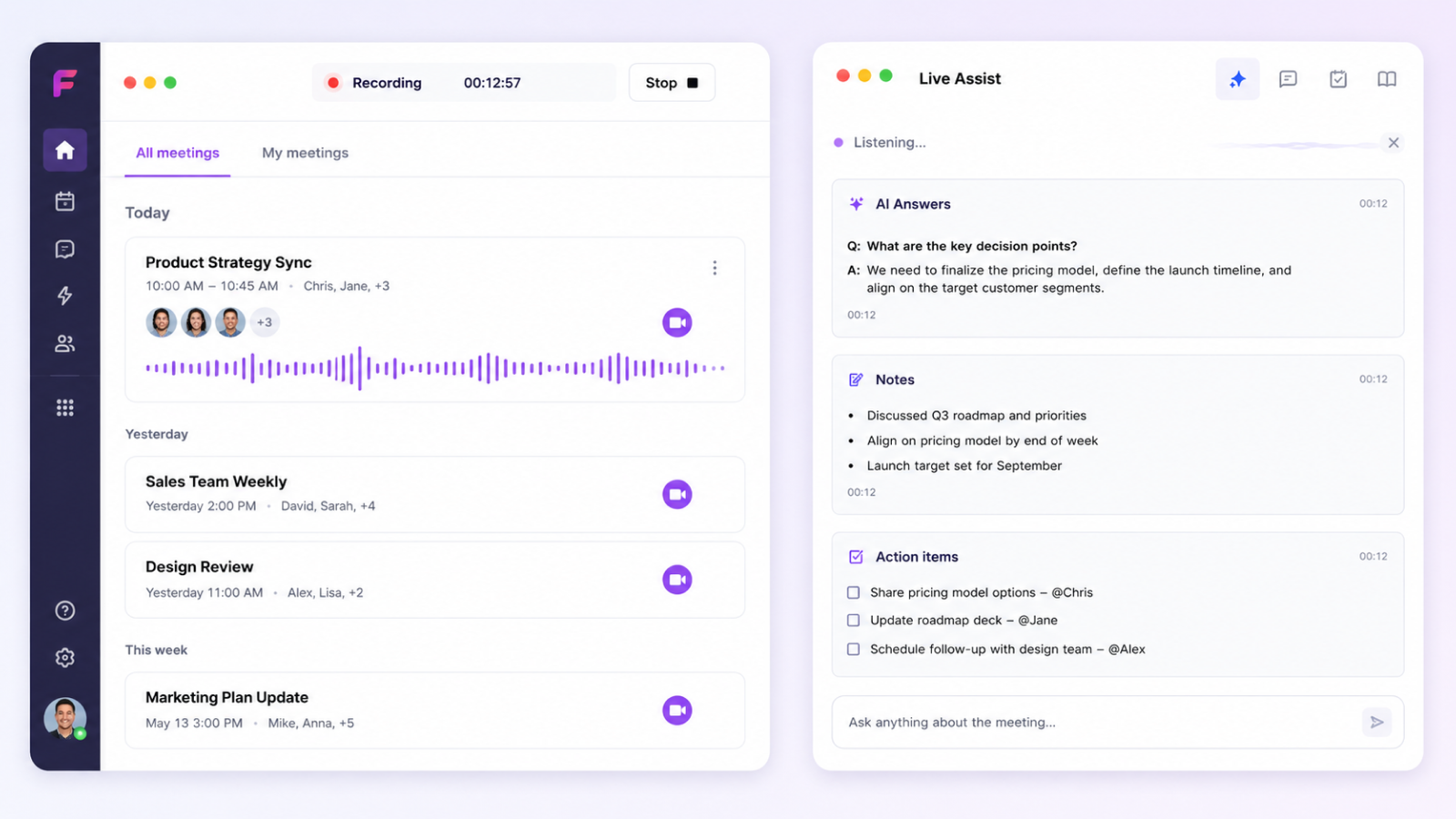
Fireflies Desktop records audio from your computer instead of sending a bot into the meeting. That makes it useful for teams that already rely on Fireflies for meeting summaries, CRM sync, and internal workflows. Its standout feature is Live Assist, a real-time panel that can surface answers, notes, and context while the meeting is still happening.
What works well:
Strong integration ecosystem across CRMs, project management apps, ATS platforms, and collaboration tools.
Live Assist for real-time prompts and context during a meeting.
Desktop recording for any computer audio source, not just scheduled video calls.
SOC2 Type II, GDPR, and HIPAA support.
Where it has limits:
Bot-free Take Notes does not save a separate audio or video recording.
Global AskFred uses AI credits.
Fireflies does not offer bilingual simultaneous transcription or real-time translation workflows.
Pricing: Fireflies has a free plan, but Desktop requires Pro, Business, or Enterprise. Pro starts at $10/mo, billed annually.
4. Plaud Desktop
Best for: Users who want to capture screenshots, text notes, and audio in the same meeting workflow.
Platforms: macOS (Intel + Apple Silicon) / Windows 10+
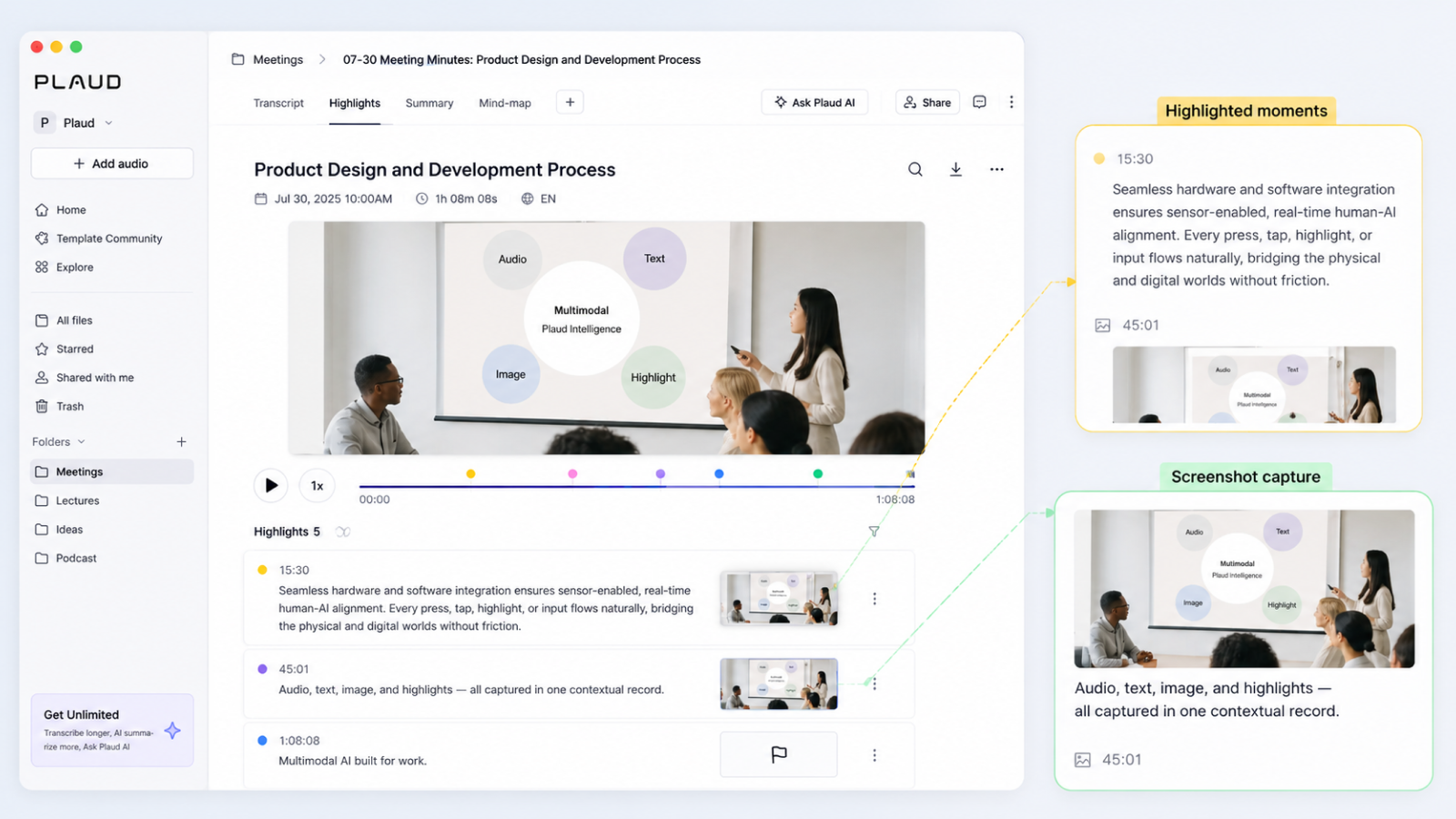
Plaud Desktop records meetings from your computer without a visible bot and brings something new to the table:multimodal capture. During a meeting, you can highlight key moments, add text notes, and capture screenshots of slides or diagrams. Those extra inputs help the AI summary understand more than just the spoken audio.
What works well:
Botless desktop capture across major meeting apps.
Screenshot capture for slides, diagrams, and visual context.
Text notes and real-time highlights that guide the AI summary.
112+ transcription languages, one language per recording
Where it has limits:
Personal Desktop access requires a bound Plaud device and an active Starter-or-higher membership. Hardware-free Team requires at least two paid seats.
The workflow is strongest if you already use Plaud’s hardware or note system.
Outputs are limited to single-meeting transcripts and summaries – no slide or report generation, and no synthesis across multiple meetings.
Pricing: Starter includes 300 transcription minutes monthly at no subscription charge, with a bound device required for Personal Desktop access. Pro costs $99.99/year for 1,200 monthly minutes; Unlimited costs $239.99/year. Work uses separate Plaud Credits.
5. Fathom Desktop
Best for: Google Meet-heavy teams who want a free, lightweight note taker.
Platforms: macOS / Windows
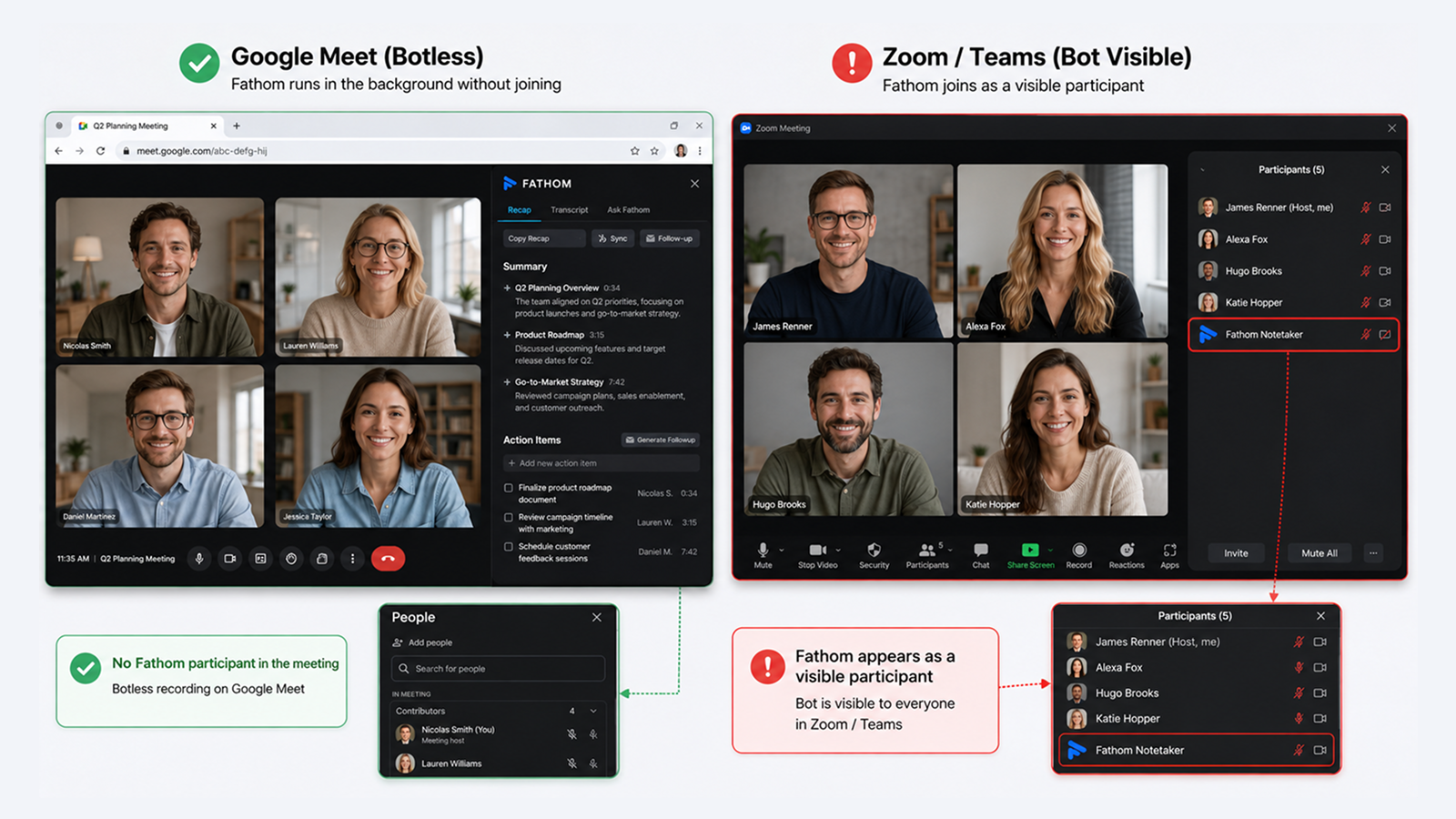
Fathom Desktop is useful, but its botless recording is narrower than some buyers expect. On Google Meet, Fathom can avoid a visible meeting participant by pairing the desktop app with a Chrome extension. On Zoom and Microsoft Teams, Fathom still uses a visible participant through its app integration.
What works well:
Unlimited free recording and transcription.
Simple meeting summaries and action items.
SOC2 Type II, HIPAA, and GDPR support.
38 supported languages.
Where it has limits:
Botless recording is fully available only on Google Meet.
No mobile app or in-person recording workflow.
No slide, infographic, report, or editable file outputs.
Pricing: The free plan includes unlimited recording and 5 AI summaries per month. Premium starts at $15/mo.
Which Botless Meeting Recorder Should You Choose?
Choose Notta Desktop if you want botless recording and stronger post-meeting output. It is the best fit for consultants, sales teams, founders, researchers, and global teams that need meeting transcription, multilingual transcription, real-time translation, meeting summaries, action items, and deliverables that they can share – all through one platform
Otter Desktop is the pick for free, simple bot-free recording when multilingual transcription isn't a requirement. Fireflies Desktop suits teams already invested in Fireflies integrations or who want Live Assist during calls. Plaud Desktop works best when screenshots and text notes are part of the meeting workflow. Fathom Desktop is the strongest free option for Google Meet–heavy teams.
The right pick comes down to where your meetings happen, what you need from the output, and how much you're willing to pay – but every tool here removes the awkwardness of a visible bot joining the call. Most of these tools offer free plans or trials, so the fastest way to decide is to run your next real meeting through the one that fits your workflow on paper – and see which output you actually use afterward.
Frequently Asked Questions
What is a botless AI notetaker desktop app?
A botless AI notetaker captures meeting audio through your computer without adding a participant to the call. Transcription may still use the cloud. It normally captures the conversation through the device you're using, rather than attending remotely for you.
Is Fireflies Desktop available for download yet?
Yes, Fireflies Desktop launched in November 2025 and is available on Mac and Windows. It offers Pro, Business, and Enterprise plans – it's not available on the Fireflies free plan.
Are botless desktop recordings as accurate as bot recordings?
Yes, the recording method doesn't significantly affect transcription quality; what matters is audio quality and the underlying model. Notta Desktop achieves up to 98.86% accuracy with local recording.
Can I use these apps with Zoom, Teams, and Google Meet?
Yes, you can. Notta Desktop works with 26+ macOS apps and 17+ Windows apps, including Zoom, Teams, Meet, and Slack. Otter Desktop supports Zoom, Google Meet, and Teams. Plaud Desktop auto-detects meetings from most major conferencing apps. Fathom Desktop works across the same platforms, though botless mode is only fully enabled on Google Meet.
Does Notta have a free plan for the desktop app?
Yes, Notta's free plan gives US users 120 minutes of transcription per month. Notta Desktop is available from the Pro plan ($8.17/mo billed annually, 1,800 min/mo). You can also start a free 7-day Business trial – no credit card required.
Is botless recording legal?
It depends on your location. In most US states, one-party consent means you can legally record a conversation you're part of without notifying others. In all-party consent states (like California) and under GDPR in Europe, you'll need to inform participants before recording. Using a desktop app doesn't change these legal requirements, it just removes the visible bot notification. When in doubt, disclose that you're recording.
Final Thoughts
The best botless meeting recorder depends on what you need after the call. Notta Desktop is the best all-around choice when you want botless recording and useful outputs after the meeting. It records locally, supports Mac and Windows, works across major meeting apps, and connects to Notta Brain, Notta’s AI Meeting Execution Engine, so your meeting can become a summary, action list, report, infographic, or slide deck.

